Language and appearance
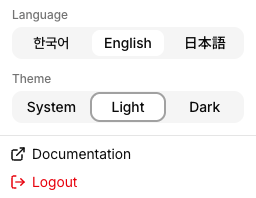
Select the menu (☰) at the upper right.
Language
Choose English, 한국어, or 日本語. Saved names and contact values are not translated.
Theme
Choose Light or Dark. System follows your device settings. The contact widget in AIP follows AIP’s language and theme.
Documentation
Select Documentation in the same menu to open the LinkPie user guide in your current language in a new tab.
Logout
Select Logout in the same menu.
Last updated on